The Volkis style guide is a constant work in progress. It covers all documents including reports, web sites, presentations, and handbook entries.
Volkis uses Australian English at all times.
Naming convention
Report filenames should be in the following format:
Volkis report - {{ client }} - {{ title }} {{ version }}The version can be omitted if the version number is 1.0.
Separate to reports, when a date is used in a filename, the date should use YYYY-MM-DD, for example 2024-09-02 for 2nd of September, 2024. Longer timestamp format is reference below.
Versions
Volkis reports and documents should use the major.minor version numbering system.
Major version gets incremented when there is a significant change to the document such as when a new section is added. In this case for example, the version would go 1.26 → 2.0.
Minor version gets incremented when a small change occurs, like a typo fix or clarification in wording. In this case, the version would go 1.9 → 1.10.
A document’s version prior to release to its intended audience always has a major version of 0. E.g. 0.4. Upon first release, its version is bumped to 1.0.
Capitalisation
Titles should be capitalised in sentence case. For example:
- External penetration testing report
- Attack walkthrough
- Volkis style guide
Capitalisation should be limited to the first letter of each sentence and proper nouns.
Emotive language
Most documents that are released by Volkis are technical documents that attempt to convey information in a concise and informative way. In technical documentation we should avoid emotive language. The application isn't suffering from anything. The vulnerability isn't extremely or enormously important.
We need to be factual and "matter of fact" when describing our findings. This might make it sound less fun but it avoids overexaggerations and being misconstrued.
This doesn't apply to blog posts and irreverent marketing. Go ahead and use as much emotive language as you want in those cases.
Dates and times
Although dd/mm/yyyy is preferred in Australia, it is ambiguous for overseas readers. For this reason, it is preferred to use yyyy-mm-dd hh-ss format.
Screenshots and images
All screenshots within a report should have captions describing the screenshots. The caption should be positioned below the screenshot.
Code blocks
Code blocks (triple ticks [```]) should be used when writing computing-based content. Computing-based content could include:
- Source code
- Command line output
- Shell commands
- HTTP requests/responses
Within a sentence, an inline code indicators (single ticks [`]) should be used. Example use cases:
- Variable names
- Function names
- Keyboard shortcuts/commands
Items that do not need to use code blocks include:
- File paths
- IP addresses
- Hostnames
- (Sub)domains
- Document names
- Product names
- Port numbers
- Line numbers
- References (including CVE numbers, RFCs, etc)
There are cases where you might use your discretion, depending on context:
- Error messages
- Usernames
- Comments within code
Specific standards and frameworks
This section covers wording and phrases for specific standards and frameworks that are commonly used.
Essential Eight
The Essential Eight Maturity Model refers to a baseline of 8 strategies for mitigating real-world cyber security attacks. It is based on the ASD's experience in responding to attacks and is regularly updated by the ASD.
- Name of the standard is Essential Eight: Avoid using "Essential 8".
- Maturity Level 1/2/3: Capitals and numerals should be used when referring to a specific maturity level (such as Maturity Level 1, Maturity Level 2, and Maturity Level 3). When you are not referring to a specific maturity level, lower case should be used.
- Avoid using the term Maturity Level 0: This term is no longer used in the Essential Eight. Instead say "Does not meet the requirements for Maturity Level 1".
- The Essential Eight is released by the Australian Signals Directorate (ASD): As of 2024, avoid saying it is released by the Australian Cyber Security Centre (ACSC)
The Essential Eight Maturity Model heirarchy should be referred as follows:
- The Essential Eight Maturity Model Framework describes eight strategies. These strategies are:
- Patch applications
- Patch operating systems
- Multi-factor authentication
- Restrict administrative privileges
- Application control
- Restrict Microsoft Office macros
- User application hardening
- Regular backups
- Each strategy has up to three maturity levels, referred to as Maturity Level 1, Maturity Level 2, Maturity Level 3.
- Each maturity level has a number of requirements. (Except Maturity Level 2 for Patch Operating Systems but that's another story)
- Each requirement can be met by a control.
Try not to get the terms mixed up.
Specific terms
This section provides directions for specific terms that may have unique meaning, capitalisation, or phrasing.
And/or
Avoid using slashes such as "and/or", "accept/enforce", etc. Instead, the sentence can be rephrased to remove and clarify it. Mostly this would be replacing "and/or" with a simple "and" or "or".
A number of
Avoid using "A number of". Instead, either say the specific number or remove the phrase.
Brute force
Use "brute-force" over "brute force" or "brute forcing". This includes:
- Brute-force attacks
- Brute-force techniques
- Brute-force search
Operating system names
We try to use the formal names for operating systems where possible:
- Android is just Android, not Google Android. You can say “Android, a mobile operating system developed by Google”.
- Apple operating systems have their specific capitalisations:
- iOS instead of IOS or Ios.
- macOS instead of MACOS or MacOS
- You should use Linux rather than GNU/Linux
Handbook page styles for Notion
There are a few nuanced elements in Notion you should be aware of.
Images
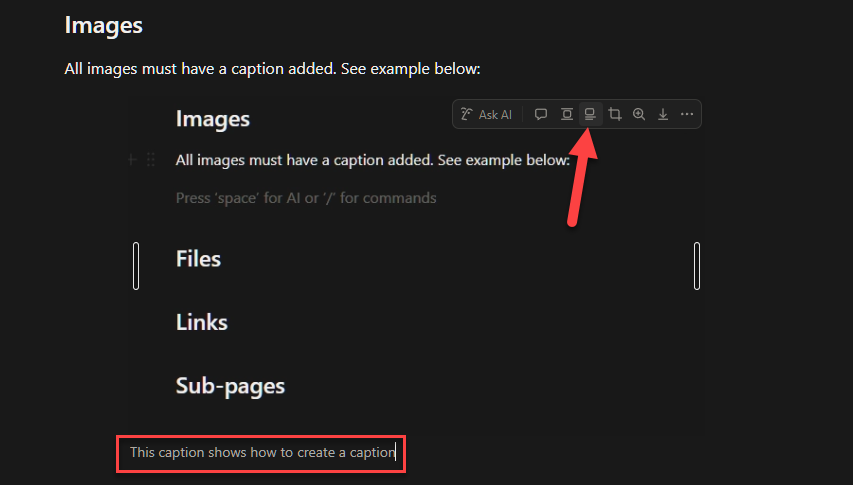
All images must have a caption added. See example below:
Files
A file can be inserted directly into Notion. This is helpful for when you want to the file to be immediately available to the reader. If the file exists elsewhere, consider linking to it instead. Example:
txthacker_manifestoFiles that are within public pages will be copied to the online version of the Handbook.
Links
Use links where possible! They are a great way to reference other areas of the Handbook or the web without forcing the reader to go looking themselves. There are a few types of links to be aware of in Notion:
External Links
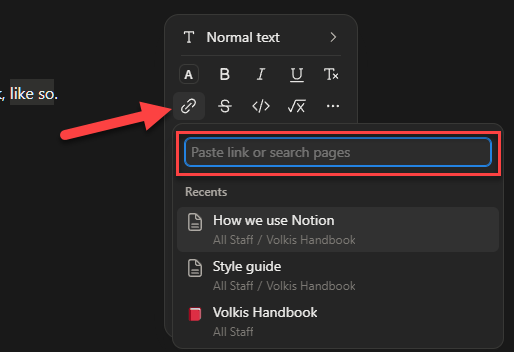
These are the simplest. Just highlight the text, select Add Link, and paste the link, like so.
Link to another Handbook/Notion page
You can also use internal links to other pages. For example, the External Penetration Test Methodology can be linked to by searching for that page under Add Link.
You can also add it as a block-level link by typing /link on a new line, like so:
Finally, if you wanted to link a specific block in a page, you can click on a block and Copy link to block (or use the Alt+Shift+L shortcut):
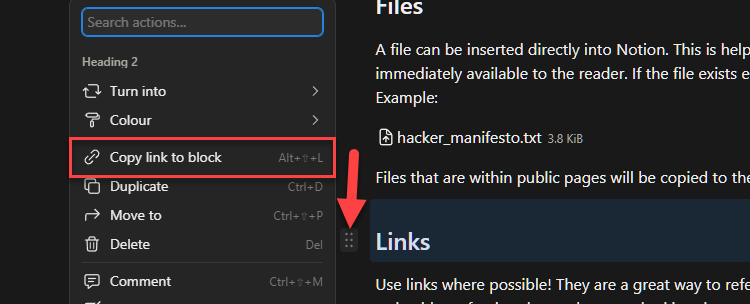
This link can then be pasted in the same way as an External Link.
Here’s an example linking to the Exploitation section in a methodology.